

The world of e-commerce is no longer about having just one online shop. If you’re a growing brand, a manufacturer with multiple product lines, or a company with global ambitions, you’ve likely realized you need multiple storefronts.
- Perhaps you need one store for your Business-to-Consumer (B2C) sales and a separate, private portal for your Business-to-Business (B2B) wholesale clients.
- Maybe you’re launching country-specific sites—one for the US, one for Germany, each with local pricing and language.
- Or maybe you manage a portfolio of distinct brands, and each needs its own unique identity and domain.
This strategy, known as Multi-Storefront E-commerce, is brilliant for growth, personalization, and market segmentation. It allows you to offer a highly customized shopping experience without having to manage entirely separate, isolated companies.
The challenge, however, is that while the front-end (what the customer sees) is separate, the back-end (the engine, the inventory, the order system) needs to be unified. This is where hosting becomes the single most critical factor.
This deep-dive guide will break down the complex world of hosting multi-storefront sites. We’ll look at the architectural choices, the specific challenges this setup creates, and the essential best practices that separate a seamless digital empire from a logistical nightmare.
1. Understanding the Multi-Storefront Model (The Crucial Distinction)
Before we talk about hosting, we must clarify what we mean by a multi-storefront setup, as it’s often confused with simpler configurations.
1.1. Single Store vs. Multi-Store vs. Multi-Storefront
| Model | Description | What it Shares | Hosting Implication |
| Single Store | One website, one brand, one domain. The simplest setup. | Everything is shared and unified by default. | Simple, standard hosting plan is usually sufficient. |
| Multi-Store (Separate) | Multiple completely separate e-commerce installations. E.g., a Shopify store, a Magento store, and a custom-built B2B portal. | Nothing. Each has its own database, inventory, admin panel, and hosting. | High maintenance cost, complex data sync, requires multiple hosting plans. |
| Multi-Storefront (Unified) | Multiple front-ends (domains/websites) all running off a single, centralized back-end platform and database. | Core Inventory, Customer Data, Order Processing, Core Platform License, and Hosting Infrastructure. | Requires a robust, scalable, and often cloud-based hosting architecture to manage shared resources and variable load. |
The key takeaway: In a true multi-storefront model, all your sites live together, sharing the same core database for things like product stock and customer records. Your hosting needs to support this shared, mission-critical foundation.
2. The Core Hosting Architecture Decision: Single-Tenant vs. Multi-Tenant
When you run multiple websites on one platform, you must decide how you will manage your underlying data and infrastructure. This decision fundamentally changes your hosting requirements.
2.1. Single-Tenant Architecture (Isolation First)
In this context, Single-Tenant means that while your stores look unified, they are separated at the database level. Each store or brand might have its own dedicated database instance.
- The Setup: Imagine having multiple fenced-off properties on a single piece of land. Each store has its own dedicated infrastructure (database, some server resources) but shares the application code (the platform).
- Best for: Businesses with extreme regulatory or legal separation requirements (e.g., handling GDPR in Europe and HIPAA in the US), or those where one store is significantly larger or higher-risk than the others.
- Hosting Implications:
- Pros: High isolation. A problem with Store A will not directly affect Store B. Excellent security and compliance for data segregation. Predictable resource allocation per store.
- Cons: Higher overhead. You must manage, update, and back up each database instance separately. Launching a new store takes longer (you have to spin up a whole new dedicated environment).
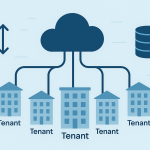
2.2. Multi-Tenant Architecture (Efficiency First)
This is the more common and efficient approach for most growing e-commerce companies. All stores share a single, massive database and a centralized application instance, using a unique identifier (like a store_id) to segregate data logically.
- The Setup: Imagine everyone living in the same apartment building. They share the same foundation, plumbing, and roof, but each unit is locked and private.
- Best for: Companies managing multiple brands, B2C/B2B separation, or regional versions of the same brand. It’s the optimal choice for operational simplicity and cost efficiency.
- Hosting Implications:
- Pros: Lower maintenance. Updates and patches are applied once. Faster market entry (launching a new store is often just a configuration change). Highly resource-efficient.
- Cons: Noisy Neighbor Syndrome. A massive traffic spike or a complex, slow query on Store A can impact the performance of Store B, as they share the same database resources. Requires extremely robust hardware, effective load balancing, and proactive monitoring.
3. The 5 Major Hosting Challenges in Multi-Storefront E-commerce
Moving to a multi-storefront model introduces complexities that standard hosting is not equipped to handle. These are the main obstacles you must overcome.
Challenge 1: Performance and The Shared Database Bottleneck
This is the number one issue. Because all your stores rely on the same database for inventory, product, and order data, the database becomes a single point of failure and the primary bottleneck for performance.
- The Problem: During a Black Friday sale on Store A, the massive influx of order writes and inventory checks can slow down the ability of Store B to process a simple product page load, even if Store B has low traffic.
- The Solution: Database Optimization & Scalability.
- Read/Write Splitting: Architect the platform to use separate database instances for “Read” operations (like browsing a product) and “Write” operations (like placing an order). This is a game-changer for speed.
- Caching Strategy: Implement aggressive, multi-layered caching at the application, database, and Content Delivery Network (CDN) levels. Cache everything that is not unique to the user (product pages, category listings) to reduce database queries.
Challenge 2: Spikes, Capacity Planning, and Load Balancing
You are no longer managing traffic for one website; you are managing the combined peak traffic of all your sites, which often hit their peaks at different times (e.g., an EU store peak vs. a US store peak).
- The Problem: Under-provisioning (not having enough server power) means all your stores crash together. Over-provisioning means paying for expensive resources you rarely use.
- The Solution: Cloud and Auto-Scaling.
- Use Cloud Hosting: Solutions like AWS, Google Cloud, or Azure are essential. They allow your server resources (like web servers) to auto-scale—automatically adding power when traffic spikes and reducing it when traffic drops.
- Effective Load Balancing: Use an advanced Load Balancer to distribute incoming traffic evenly across your multiple web servers, ensuring no single server is overloaded, and maintaining optimal response times for every storefront.
Challenge 3: Localization and Geolocation
A multi-storefront setup often means serving different geographic markets, which introduces challenges around speed and content delivery.
- The Problem: A customer in Singapore visiting your US store will experience slow load times because the server is in Virginia. Furthermore, the website needs to serve the correct language, currency, and local shipping/tax rules automatically.
- The Solution: A Global CDN and Geo-IP Routing.
- CDN (Content Delivery Network): A global CDN is non-negotiable. It caches your static assets (images, JavaScript, CSS) on servers near your customers, making the storefront feel instantly fast, regardless of where the core server is.
- Geo-IP Routing: Configure your DNS and Load Balancer to automatically route a user to the closest storefront server or ensure the correct regional content is served based on their geographical IP address.
Challenge 4: Security, Compliance, and Data Segregation
You are managing sensitive customer and payment data from multiple regions under one digital roof, which significantly increases your security and compliance footprint.
- The Problem: Meeting GDPR requirements for EU customers while simultaneously adhering to PCI-DSS standards for payment data across all stores can be complex. A breach on one storefront affects all of them.
- The Solution: Centralized Security and Isolation Layers.
- Unified WAF (Web Application Firewall): Use a single, powerful WAF to protect all storefronts from common threats (like SQL injection or DDoS attacks).
- TLS/SSL: Use a Multi-Domain SSL Certificate (SAN/UCC) to secure all your unique domains (
storeA.com,storeB.co.uk) with a single certificate for streamlined management. - Access Control: Implement strict, role-based access control (RBAC). A user in the German admin panel should not be able to view customer data from the US store unless their role specifically allows it.
Challenge 5: Development, Deployment, and Updates
In a shared platform, updating the core code or adding a new feature must be done flawlessly, as an error can take down all your sites simultaneously.
- The Problem: A small code change for one store’s unique feature breaks a critical function on all the other stores.
- The Solution: Automated, Tiered Deployment (CI/CD).
- Use Containerization (Docker/Kubernetes): This packages the application and all its dependencies so it runs identically in every environment, from a developer’s laptop to the production server.
- Staging Environment: Maintain a complete, mirror copy of your production environment (the Staging or UAT environment). Never deploy a new feature, update, or patch without testing it thoroughly on Staging across all storefronts first.
- CI/CD Pipeline: Automate the process (Continuous Integration/Continuous Delivery). This ensures that code changes are automatically tested, built, and deployed in a structured, repeatable way, drastically reducing the risk of manual error.
4. Best Practices for Choosing and Managing Your Multi-Store Hosting
The right hosting isn’t just a server; it’s an entire ecosystem that supports your business strategy.
4.1. Prioritize Managed Platform Hosting
For multi-storefront e-commerce, Managed Cloud Hosting (like an optimized solution from a specialized e-commerce host or cloud provider) is almost always the superior choice over self-managed hosting.
- Why? A specialized host has pre-configured the infrastructure for high availability, database scaling, caching, and security—the exact pain points of a multi-store system. You get to focus on selling, not on managing server uptime and database clusters.
4.2. Build a Master Inventory and PIM (Product Information Management)
A centralized Product Information Management (PIM) system is not strictly a hosting component, but it’s essential to making your hosting architecture work.
- The PIM holds the single source of truth for all product data (SKUs, descriptions, images).
- The hosting infrastructure must be designed for seamless, real-time integration with this PIM, ensuring that when an inventory level changes (a sale on Store A), the shared database updates instantly, and Store B reflects the new stock level. A latency of even a few seconds can lead to overselling.
4.3. Implement an Intelligent Caching Strategy
You need three layers of caching to truly scale a multi-store platform:
- Browser Cache: The user’s browser stores things like logos and main images.
- CDN Cache (Global): Stores static assets (like all product images and CSS) on edge servers close to the user.
- Application/Database Cache (Local): Stores frequently accessed data (like product prices or category trees) directly in memory on your server, preventing a slow, costly query to the main database. Tools like Redis or Memcached are essential here.
4.4. Set Up Comprehensive Monitoring and Alerting
When you have multiple stores, you can’t manually check each one. You need to know about a performance issue before your customers do.
- Metrics to Track: Monitor everything: CPU Usage, Database Query Times, Disk I/O, Error Rates (4xx/5xx), and Application Response Time (latency) for each individual storefront.
- Automated Alerts: Set up alerts for unexpected traffic drops (Store is down), high error rates, or database latency spikes. Tools like New Relic, Datadog, or integrated cloud monitoring (AWS CloudWatch, etc.) are invaluable.
5. The Headless Future: Separating the Front and Back-End
If you are building a new multi-storefront solution, consider a Headless E-commerce architecture. This represents the ultimate solution for managing complexity and achieving extreme customization.
What is Headless?
In a traditional setup, the front-end (the visual website) and the back-end (the e-commerce platform) are tightly connected. In Headless, you decouple them:
- The “Head” (Front-End): This is the theme, the design, and the user interface. You can build separate, unique “Heads” for each store (e.g., one built with React for your B2C site and one built with a static site generator for your B2B portal).
- The “Body” (Back-End): This is your central e-commerce platform, database, and hosting.
The Hosting Advantage of Headless:
By separating the “Heads,” you gain two major hosting benefits:
- Hyper-Performance: The front-end can be hosted on incredibly fast, light-weight services (often called Jamstack hosting or static hosting), leading to lightning-fast load times for every storefront.
- Total Isolation: The design of Store A is now completely independent of Store B. An update to the design or code on one front-end cannot break the other. The only thing they share is the central API (Application Programming Interface) connection to the secure, stable back-end.
This architecture is the current gold standard for enterprise-level multi-store scaling, offering the best mix of unified data and isolated, customized performance.
Conclusion: Build an Empire, Not a Collection of Islands
Hosting a multi-storefront e-commerce platform is one of the most rewarding challenges in the digital world. It allows you to offer tailored, localized, and segmented shopping experiences to different audiences while maintaining operational efficiency through a central core.
Success is not about choosing the cheapest shared hosting plan. It’s about investing in an intelligent, scalable architecture that protects your central database, employs aggressive caching, and uses the power of the cloud to automatically scale with your traffic. By embracing centralized control, sophisticated monitoring, and modern practices like CI/CD and Headless architecture, you will ensure your multi-storefront empire operates as a powerful, unified force, capable of scaling to meet the demands of global commerce.